DOJ Digital Accessibility Rule for City Managers
Key Conclusion
The DOJ's 2024 Digital Accessibility Rule is fully enforceable, and procrastination is no longer an option. More than one in four US adults has some form of disability, and inaccessible government websites create barriers to essential services while exposing your jurisdiction to significant legal and financial risk. However, accessibility improvements deliver measurable returns - better user experience for all residents, reduced call center volume, improved search rankings, and enhanced community trust. Most agencies see ROI within 12-18 months.
Bottom line: City managers who act decisively now will protect their communities, reduce costs, and demonstrate commitment to serving all residents equitably.
Executive Summary
What You Need to Know
Your Compliance Deadline:
Jurisdictions with 50,000+ residents: April 24, 2026 (48 days away)
Smaller jurisdictions & special districts: April 26, 2027 (13 months away)
The Stakes:
Average settlement costs: Many accessibility cases settle in the $10,000 to $75,000 dollar range, and total cost per lawsuit often exceeds $100,000 dollars when legal fees and remediation are included.
DOJ investigations can be "like an IRS audit; it can take years to get through... it's painful, and it's also public"[4]
Non-compliance excludes residents with disabilities from essential services and violates civil rights
The Opportunity:
As Don Torrez emphasized: "Websites are the city hall to your residents." Making them accessible isn't just compliance - it's better government service delivery.
What Success Looks Like:
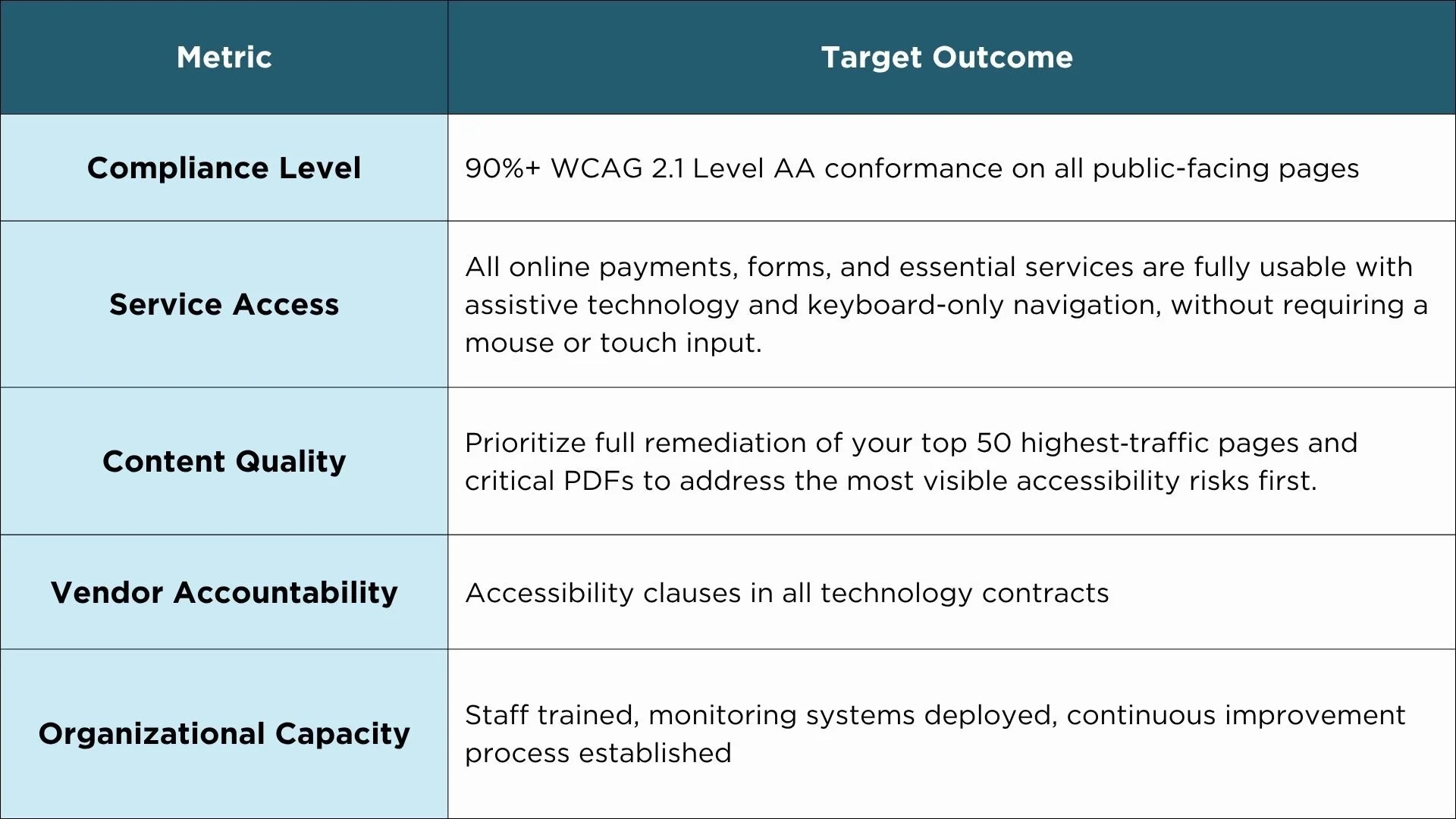
Table 1: Accessibility Compliance Success Metrics
Key Quotes
Don Torrez addressed whether the rule will be enforced, stating, "It’s fully enforceable, and there’s no reason to think that it won’t be. If you can be confident that your website’s accessible, it’s a powerful defense against this."
Don Torrez explains that while the perceived high cost of accessibility often leads to procrastination, the solution is to take immediate, incremental steps rather than waiting for a perfect end state. By avoiding absolute claims and embedding inclusive design into daily workflows, organizations can ensure that everything they build today remains both accessible and future-proof.
Immediate Action Plan
Week 1: Emergency Assessment (Days 1-7)
Secure executive leadership: Brief governing body and obtain formal resolution of commitment
Assign accountability: Designate Digital Accessibility Coordinator with authority and budget
Conduct rapid audit: Hire consultant or use automated tools to identify critical gaps (budget $10K-$20K for emergency assessment)
Identify high-risk areas: List top 20 pages by traffic, all transaction systems, essential forms
Allocate emergency budget: Secure funding for immediate critical fixes.
Weeks 2-4: Critical Barrier Removal (Days 8-28)
Priority 1: Essential Services (Highest Legal Risk)
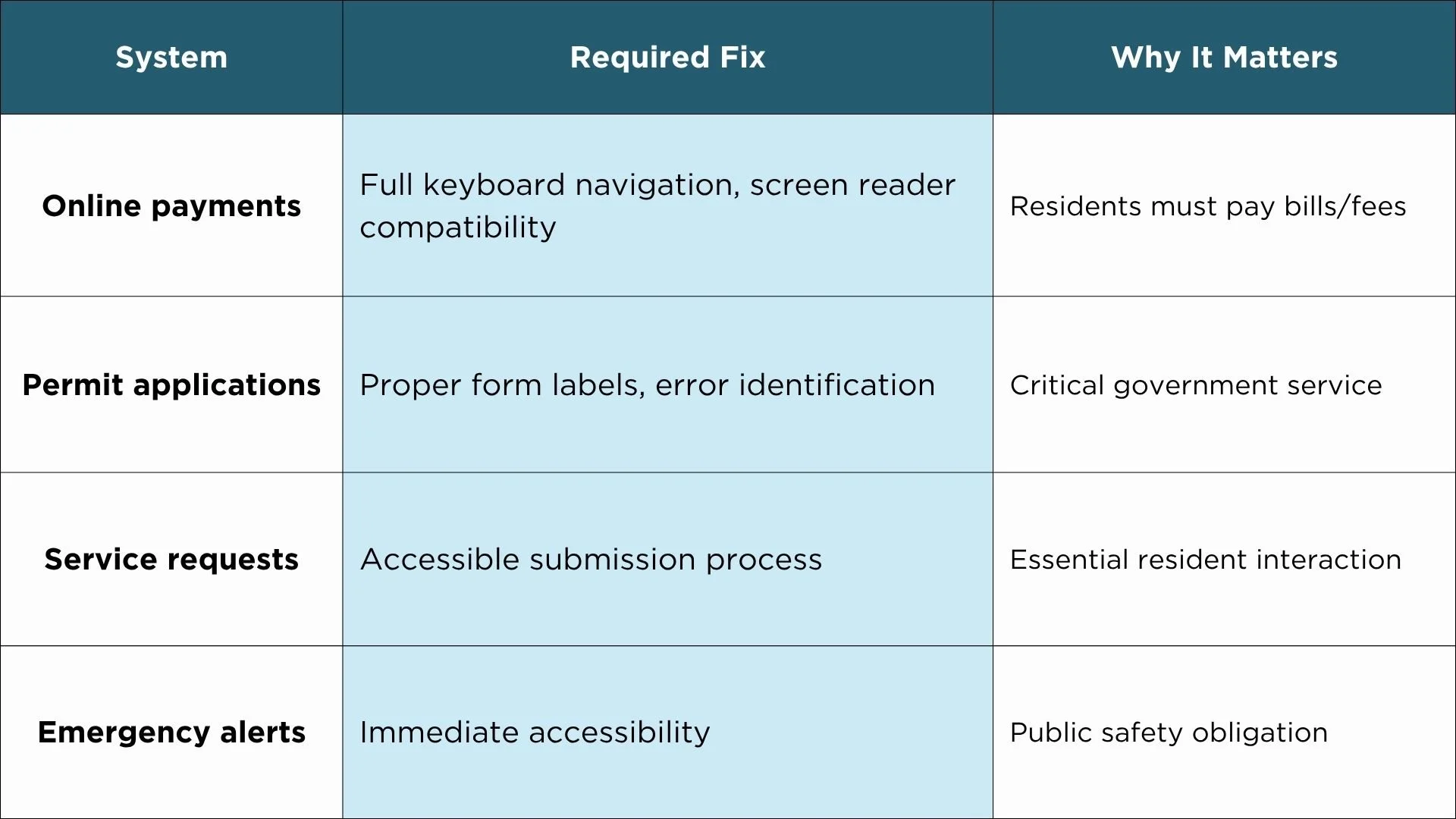
Table 2: Critical Systems Requiring Immediate Remediation
Priority 2: Quick Wins
Fix homepage and main navigation structure
Add captions to board meeting videos and public announcements
Correct color contrast issues (often automated)
Add alt text to images, links, buttons, and all interactive elements
Ensure proper heading hierarchy (H1, H2, H3) site-wide
Weeks 5-6: Documentation and Governance (Days 29-42)
Accessibility statement: Within the first month, agencies should begin visibly demonstrating progress to residents by publishing an accessibility statement, documenting exceptions, and putting a public remediation and monitoring plan in place.
Document exception claims: Properly justify any archived content or undue burden claims (Section 2 of Blueprint)
Create public remediation schedule: Show commitment to ongoing improvements
Establish monitoring system: Monthly automated scans, quarterly manual testing
Update procurement requirements: Add accessibility clauses to all vendor contracts
Most Common Compliance Gaps
The Top 5 Issues That Trigger Lawsuits
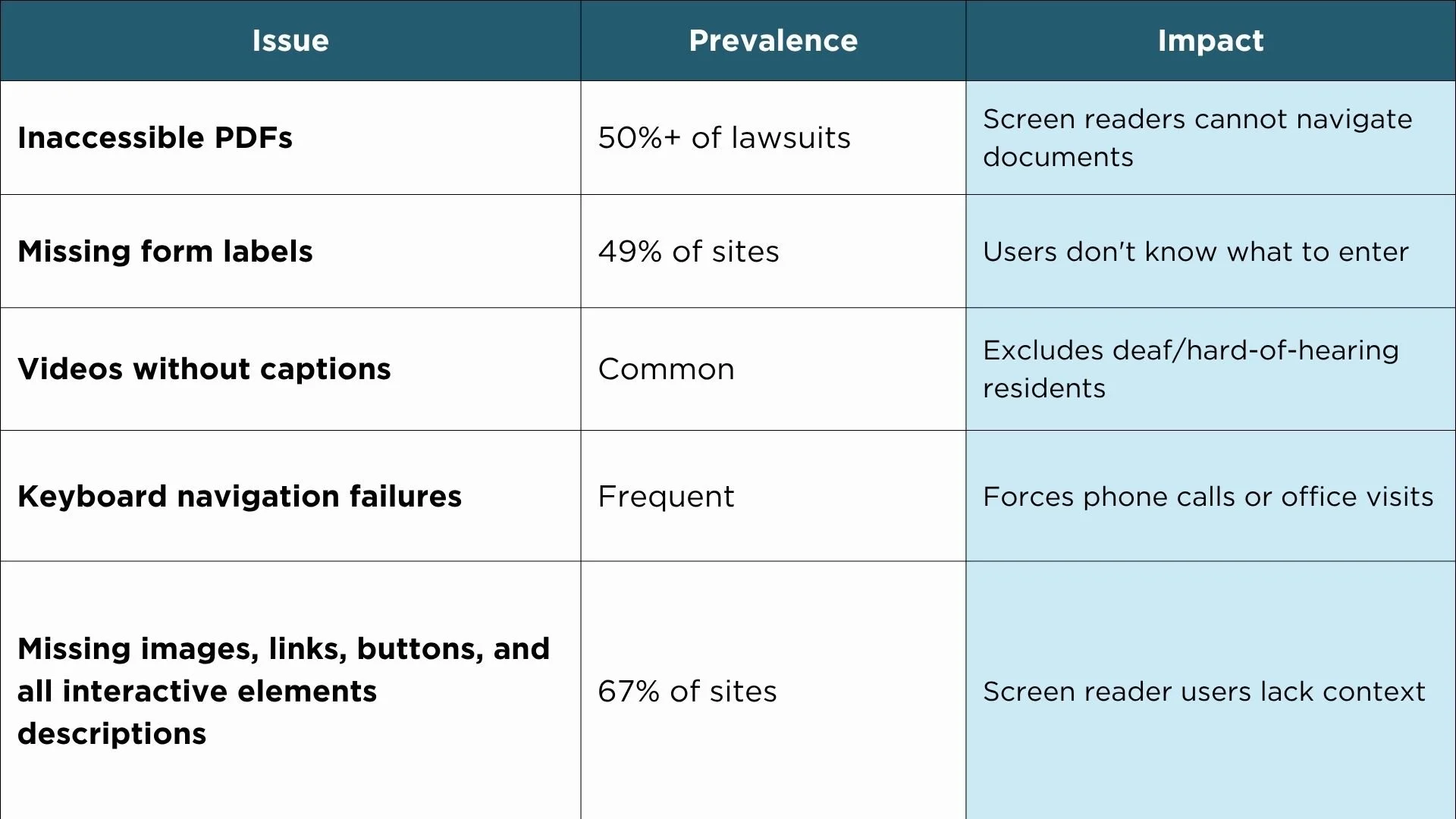
Table 3: High-Risk Accessibility Violations
The Web Content Accessibility Guidelines (WCAG) Framework
Don Torrez explained the four foundational principles that make WCAG manageable:
Perceivable: Content has descriptions, videos have captions, text has sufficient contrast
Operable: Users can navigate with keyboard, have time to complete tasks, avoid seizure triggers
Understandable: Plain language (7th grade reading level), consistent navigation, helpful error messages
Robust: Works across browsers and devices, compatible with assistive technologies
"Breaking accessibility down into four clear categories turns a complex standard into a simple, practical checklist you can actually use every day." — Don Torrez
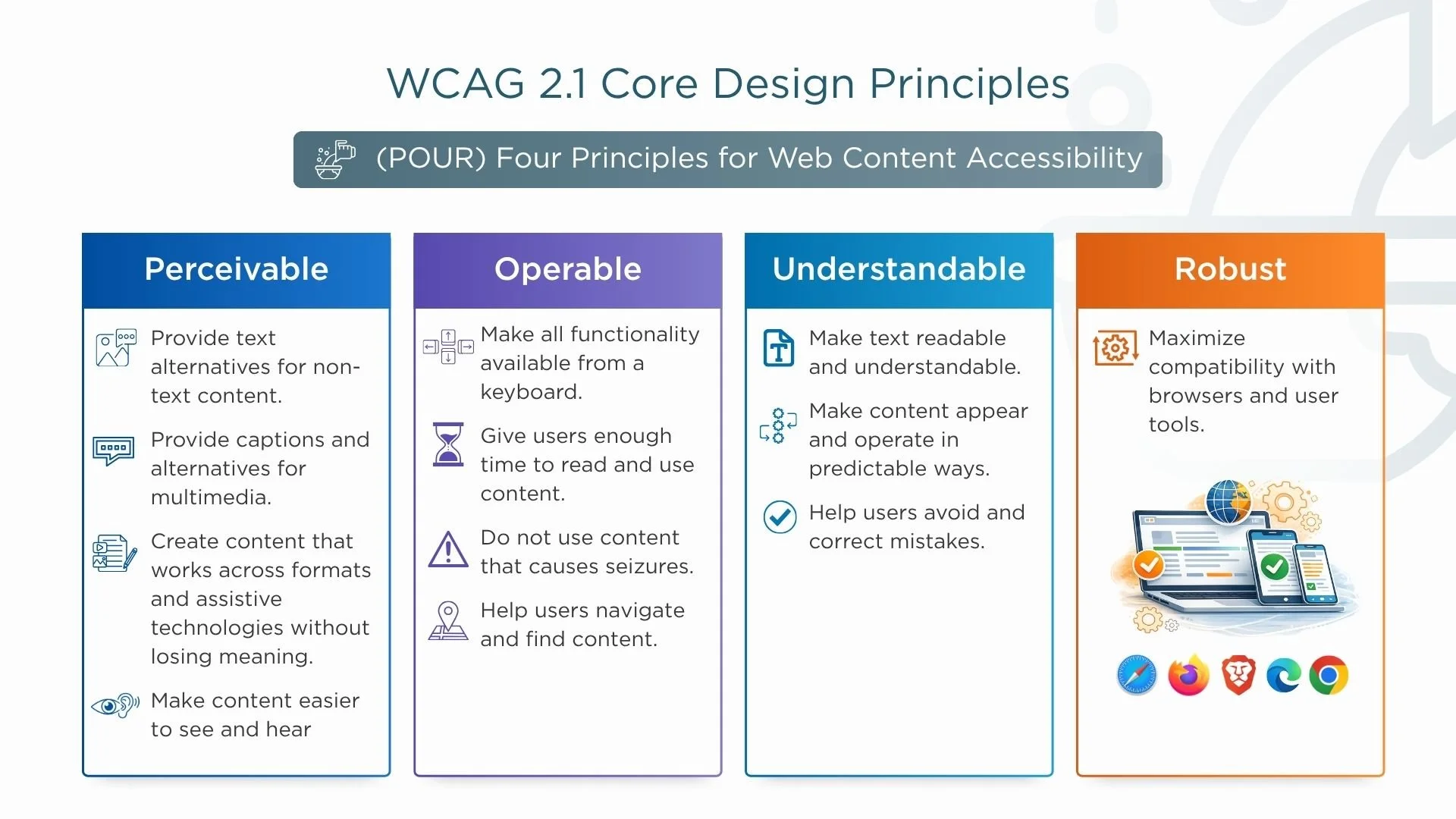
(POUR) Four Principles for Web Content Accessibility
Strategic Vendor Management
Why This Matters
The webinar highlighted a critical issue: "Web apps or mobile apps need to be compliant. If you're using a third party vendor, you should just hold them responsible. They should know about accessibility and make sure that their applications are accessible."
Required Contract Language
Every technology contract must include:
Conformance standard: "Vendor shall ensure all deliverables conform to WCAG 2.1 Level AA"
VPAT requirement: Current Voluntary Product Accessibility Template documenting compliance
Testing obligation: Quarterly accessibility testing with automated tools and assistive technology
Remediation timeline: 30-day fix requirement at no additional cost
Indemnification: Vendor liability for accessibility-related claims or litigation
Vendor Evaluation Criteria
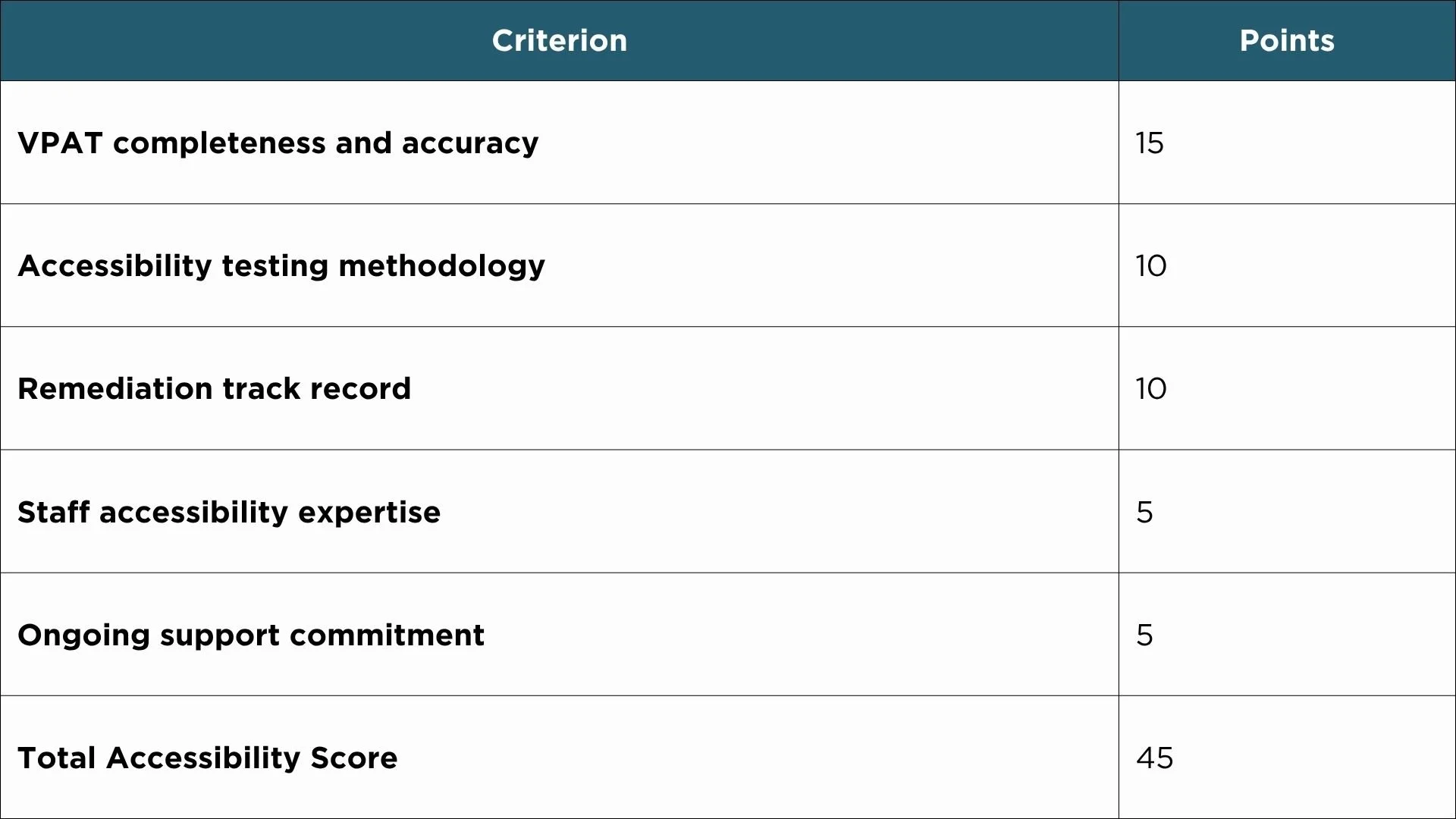
Table 4: Recommended Accessibility Scoring in RFP Evaluation (20-25% of total score)
Return on Investment
Initial Investment vs. Benefits
Typical Mid-Size Municipality (First Year):
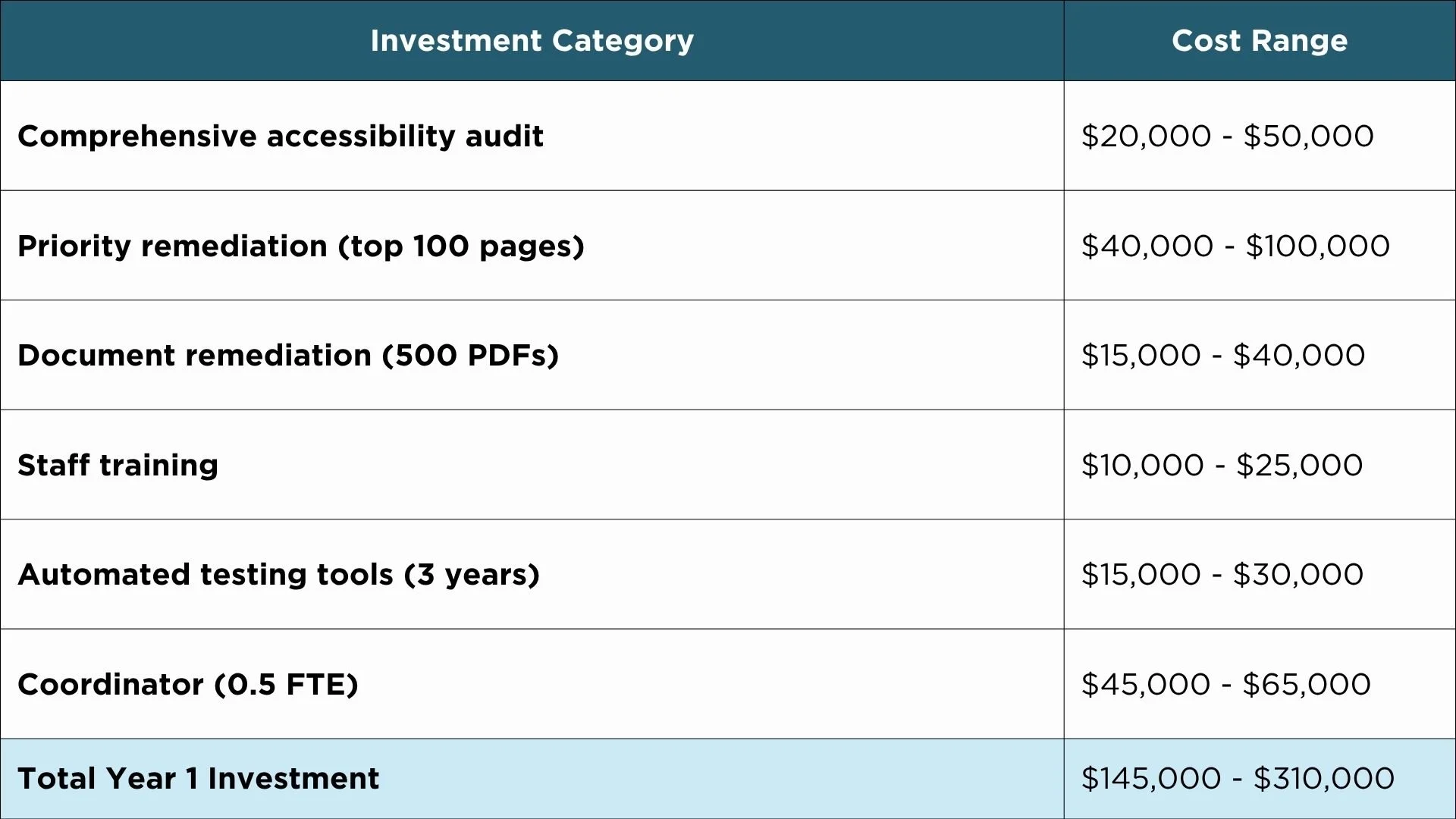
Table 5: First-Year Implementation Costs
Note: cost ranges are illustrative, based on common market pricing and DOJ impact analysis, and will vary by jurisdiction size and scope of work.
Annual Benefits:
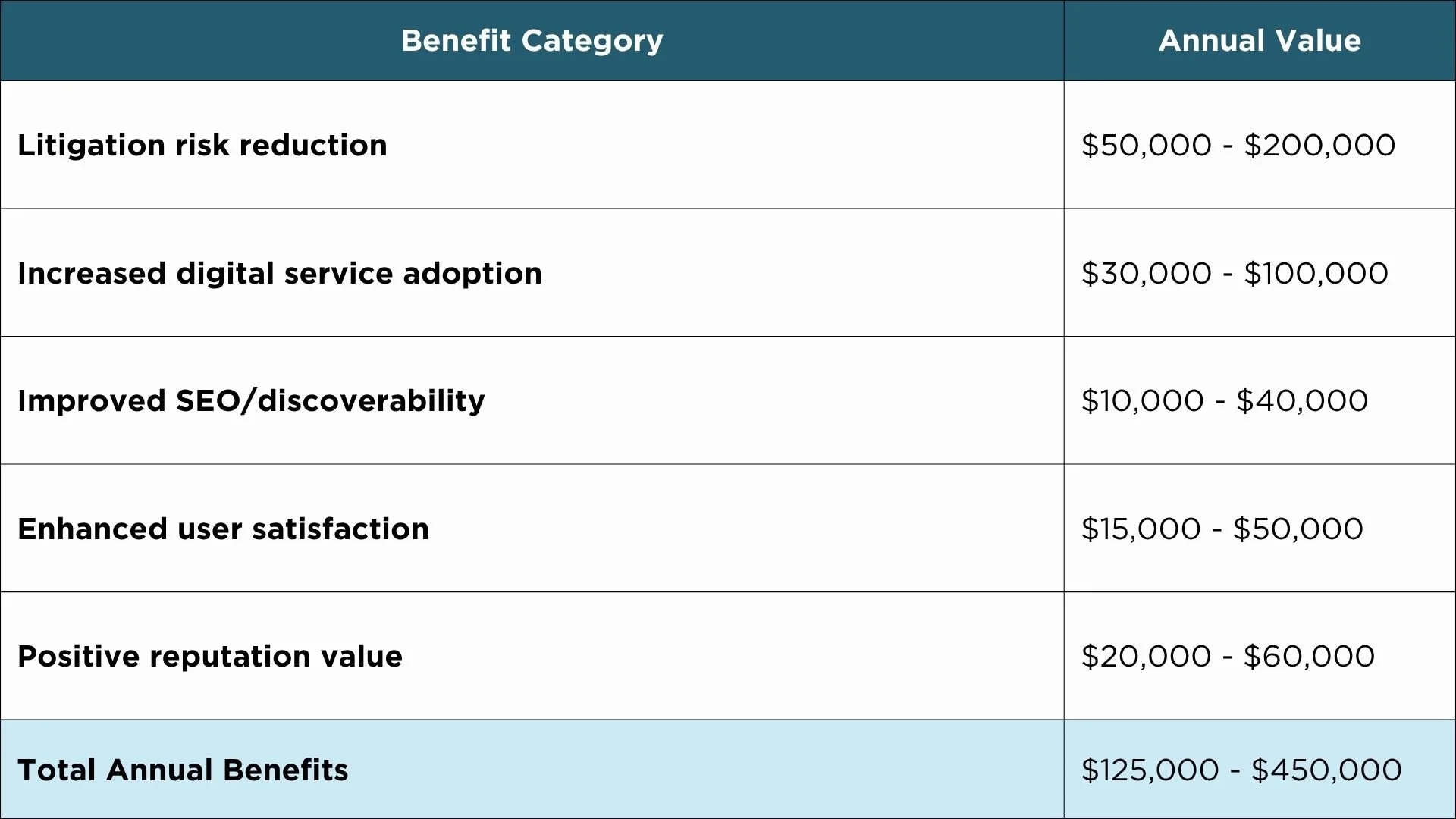
Table 6: Quantifiable Annual Benefits
Note: Cost and benefit ranges are illustrative planning estimates based on common market pricing and accessibility program experience. Actual amounts will vary by jurisdiction size, scope, and vendor.
Payback Period: 12-18 months for most government entities
Beyond the Numbers
Building an accessible website does more than meet a standard; it significantly elevates your user experience (UX) scores.
As John Wiersma emphasizes, accessibility is intrinsically linked to Search Engine Optimization (SEO) - because when content is king, accessible content is what allows that king to reach every citizen."
Equity and inclusion: Fulfills civil rights obligations to all residents
Digital transformation: Accessible-first design accelerates service digitization
Community trust: Demonstrates commitment to serving all residents equitably
Workforce development: Accessibility skills enhance staff capabilities across departments
Five Critical Decisions for City Managers
Decision 1: Assign Executive-Level Accountability
Action: Designate a Digital Accessibility Coordinator with direct authority, budget control, and executive support.
Why: As the webinar demonstrated, this requires cross-departmental coordination and sustained commitment. Without executive backing, accessibility becomes "someone's side project" and fails.
Decision 2: Address the "PDF Mountain" Immediately
The Problem: Many organizations suffer from a "digital blind spot" where they lack a clear inventory of their legacy files and the accessibility hurdles buried within them. This lack of oversight, paired with the staggering volume of technical violations found in each document, creates a massive compliance debt that effectively blocks residents with disabilities from accessing essential public information.
As Bratton Riley noted, "Most agencies don't even know how many non-compliant PDFs they have. When they check, they often find hundreds of accessibility violations per document.
Action:
Inventory all public facing PDFs, then use your web analytics to identify and remediate the highest impact documents first, focusing on the most visited pages and frequently used forms
Convert high-priority PDFs to accessible HTML or remediated format
Archive rarely-accessed documents with request mechanism
Decision 3: Make Accessibility a Procurement Requirement
Action: Immediately update all RFP templates, contract templates, and procurement evaluation criteria to include mandatory accessibility requirements. No new technology purchases without VPAT and conformance validation.
Decision 4: Document Everything
From Mary Frances Coryell: "I would advise you to document everything that you do in progress and be ready for that."
Action: Create audit trail showing:
Baseline assessment results
Remediation priorities and timelines
Budget allocations and expenditures
Progress reports and milestone completion
Exception justifications (if applicable)
Resident feedback and response actions
Decision 5: Build Sustainable Capacity
As Don Torrez points, "When your documents are scattered and unmanaged, your time is too. A clear content strategy is the only way to avoid living in constant accessibility firefighting mode"
Action:
Train all content creators on accessibility basics
Integrate accessibility testing into content workflow
Establish automated monitoring (daily scans of critical pages)
Create accessibility champions network across departments
Make accessibility part of annual performance goals
What Not to Do: Common Mistakes
Mistake 1: Treating overlays as a complete solution. Overlays can mask issues, but they do not fix your underlying code and they have not stopped accessibility lawsuits
From the webinar: "The overlay provides the band aid over the accessibility issues, but it doesn't solve the underlying problem."
Overlay widgets don't fix your actual content and provide no protection from lawsuits. Fix the source.
Mistake 2: Claiming "Undue Burden" Without Documentation
The "undue burden" exception requires:
Written determination by highest executive (City Manager, Mayor)
Detailed cost analysis with actual quotes
Budget impact assessment
Alternative access plan
Annual reassessment
Courts are highly skeptical of undue burden claims. Use only as a last resort with rigorous documentation.
Mistake 3: Making Absolute Compliance Claims
As Don Torrez warned: "Don't make absolute claims."
Don't state "our website is 100% compliant" when you haven't tested everything. Instead, communicate progress: "We're actively working toward full accessibility compliance and have completed remediation of [specific areas]."
Mistake 4: Waiting for Perfect Information
The procrastination trap: Waiting for clarity, more budget, better timing, or the "right" solution.
Reality: As Don emphasized, "Take steps forward right away." Demonstrating good-faith effort and steady progress provides far better legal protection than doing nothing while you plan.
Next Steps: Your 30-Day Launch Plan
Week 1
Draft accessibility statement for website
Brief governing body with formal resolution of support
Appoint Accessibility Coordinator with authority
Conduct rapid automated scan of website
Identify top 20 pages and critical transaction systems
Week 2
Obtain detailed quotes for audit and remediation support
Secure emergency budget allocation
Begin keyboard navigation testing of payment/form systems
Inventory PDFs and videos requiring captions
Week 3
Engage consultant or begin in-house remediation of critical pages
Update procurement templates with accessibility requirements
Schedule staff training sessions
Week 4
Deploy fixes to highest-priority pages
Publish accessibility statement with feedback mechanism
Establish monthly monitoring schedule
Report progress to executive leadership
Conclusion: Leadership in Action
Don Torrez's message from the webinar resonates: "Websites are the city hall to your residents." For the 28.7% of adults with disabilities, an inaccessible website isn't an inconvenience - it's exclusion from government services they have a civil right to access.
Your legacy as a city manager will be measured not just by balanced budgets and efficient operations, but by whether every resident - regardless of ability - can access the government services you provide.
The time to act is now.